Log in


Click here to go see the bonus panel!
Hovertext:
Clearly the talking snake had a few bites anyway.
Today's News:

|
Software developer, racing fan
|
Hovertext:
Clearly the talking snake had a few bites anyway.

One might ask, with all the advancements in container orchestration, why even bother looking under the hood? Well, depending on whether you're running a managed or self-managed cluster, the answer could vary — sometimes it matters a lot. Beyond that, understanding how Kubernetes actually works under the hood is crucial when you're managing clusters at scale. It helps with troubleshooting, performance tuning, and designing more resilient systems.
And last but not least, it's just fun!
First of all, let us take a look at how a very primitive container orchestration system might work. This will give us an idea of how everything fit together.
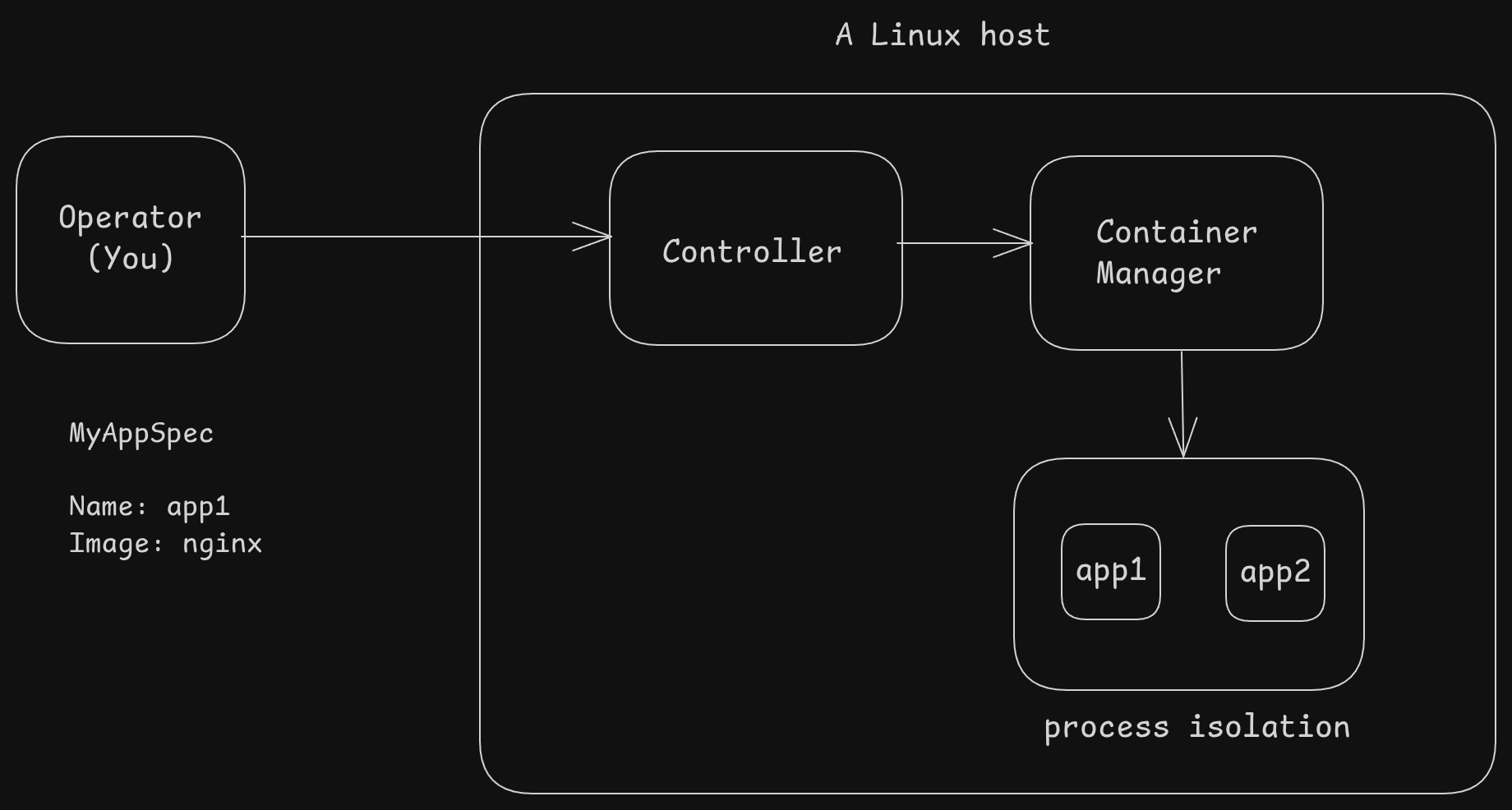
We have a single Linux machine (no clustering, sorry)
nginxOf course, this is a really dumbed-down view – it’s only meant to give you a rough idea of how container orchestration might work. A real-world production-grade orchestrator like Kubernetes is a lot more complex — but not because the core idea is different,
just because Kubernetes needs to handle a lot more things: clustering, networking, scheduling, health checks, scaling, and more.
Maybe take a look at the Kubernetes architecture to compare the mental model
Before we dive into Kubernetes, let's take a quick look at how Linux itself runs processes. At the end of the day, a container is just a Linux process(s) under the hood.
When you start a program on Linux, the OS creates a process. This process has a unique ID called PID (Process ID). Each process has its own memory, file descriptors, etc.
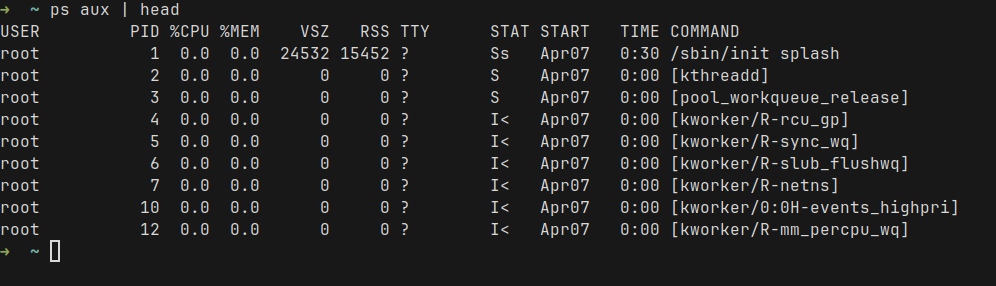
Linux organizes these processes into a tree where each process has a parent – except the very first one (called init or systemd). For example, this is how the tree looks like, using the pstree command
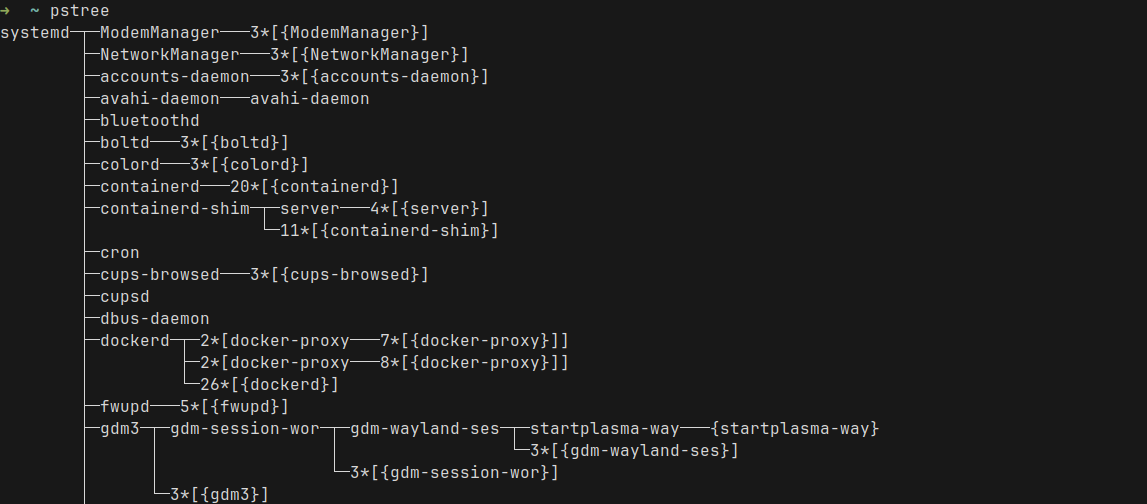
By default, processes share resources such as file systems, network interfaces, etc. But we need some way to isolate them. But why?
Without isolation, processes can see and interfere with each other. A misbehaving or compromised app process could inspect other processes, access shared files, or disrupt the network. Additionally, we don't want one bad process to starve others of precious resources such as CPU, memory, disk, or network.
For this, Linux uses two major features:
Together, namespaces and cgroups let us sandbox processes in a lightweight way — in contrast to running a full virtual machine for each application.
Alright, now that we have refreshed our memory on how Linux processes work, let's take a look at Kubernetes. For this exercise, I want to run a Kubernetes cluster, deploy a pod, and take a look at how it runs as processes.
I will use k3s to create a cluster on a Linux VM.
Installing k3s is fairly easy. Follow the quick start guide
curl -sfL https://get.k3s.io | sh -Run ps and grep for the k3s related process names
ps aux | grep -E 'k3s|containerd|etcd|flannel|kube'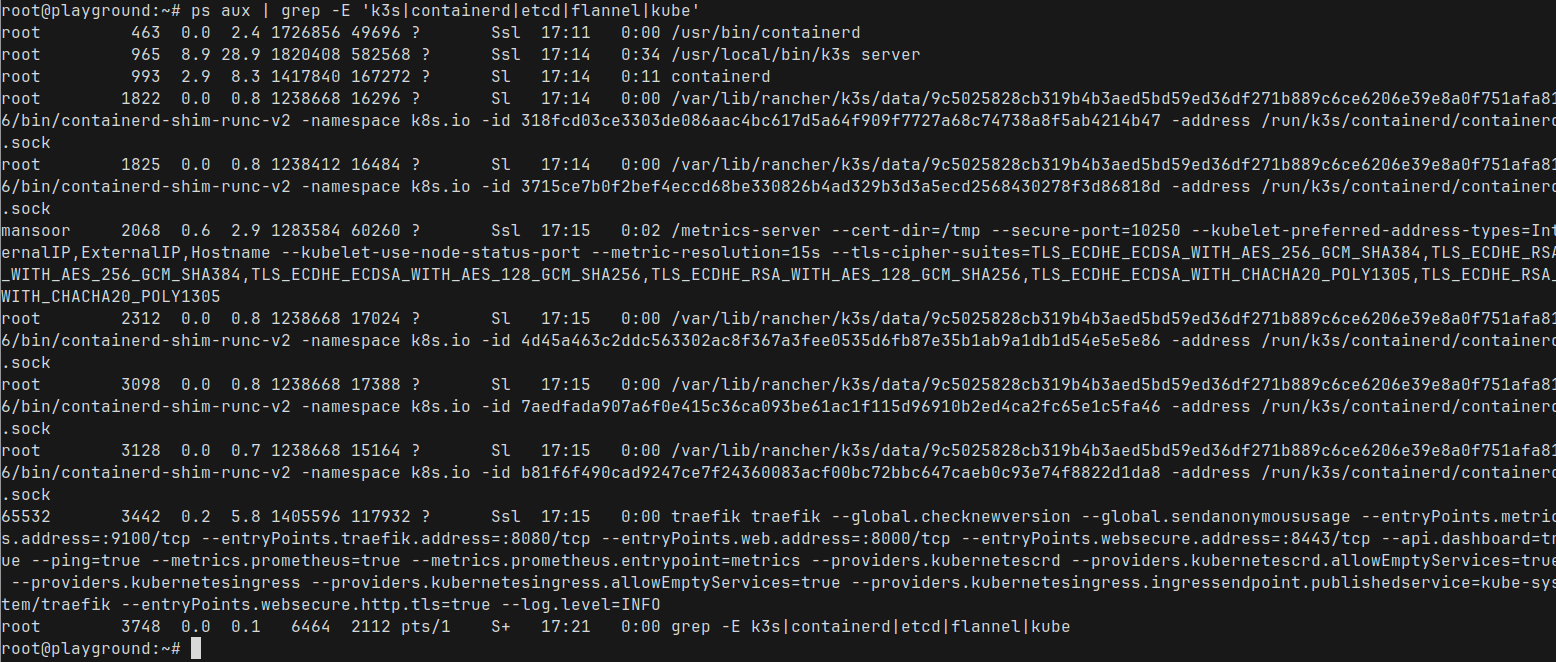
That's a lot of processes. But we don't need to worry about them all. Only few are important in this context
We can ignore the rest for now
namespace here means the Linux namespace and is different from the Kubernetes namespaceWe can use the command lsns to list the current namespaces
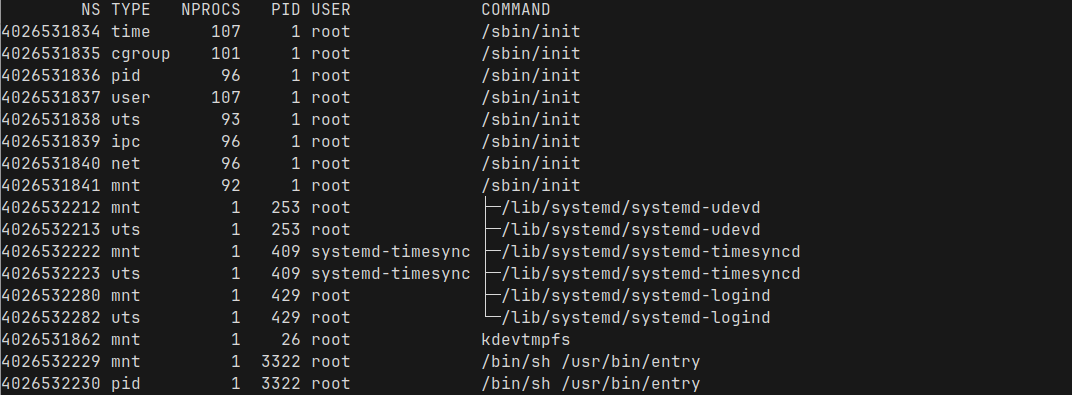
At this point, most of these namespaces are system-wide, created by init when the machine is booted. We can see what type of namespace each one is - pid, network, mount, etc.
We can see the current cgroups at /sys/fs/cgroup

This won't make much sense right now, but I promise we will come back to it soon!
Now that we have seen what's running on the system, let's deploy a simple pod. We will use Nginx for this example. I will create the pod.yaml
apiVersion: v1
kind: Pod
metadata:
  name: nginx
spec:
  containers:
  - name: nginx
    image: nginx:stable-alpine
    ports:
    - containerPort: 80
And create it using kubectl apply -f pod.yaml
And our pod is running under the default Kubernetes namespace
root@playground:~# kubectl get pod
NAME    READY   STATUS    RESTARTS   AGE
nginx   1/1     Running   0          6s
root@playground:~#
We can get some details about our new pod using kubectl describe pod nginx
root@playground:~# kubectl describe pod nginx
Name:             nginx
Namespace:        default
Node:             playground/192.168.61.101
Status:           Running
IP:               10.42.0.9
Containers:
  nginx:
    Container ID:   containerd://1da4ef4758e3404c6be5d7222115c64d7007cec7c67b8c0fb84ba391bf347c38
    Image:          nginx:stable-alpine
    Port:           80/TCP
Host Port: 0/TCPNow that we have our pod running, let us run pstree to see all the processes in our Node where k3s is running
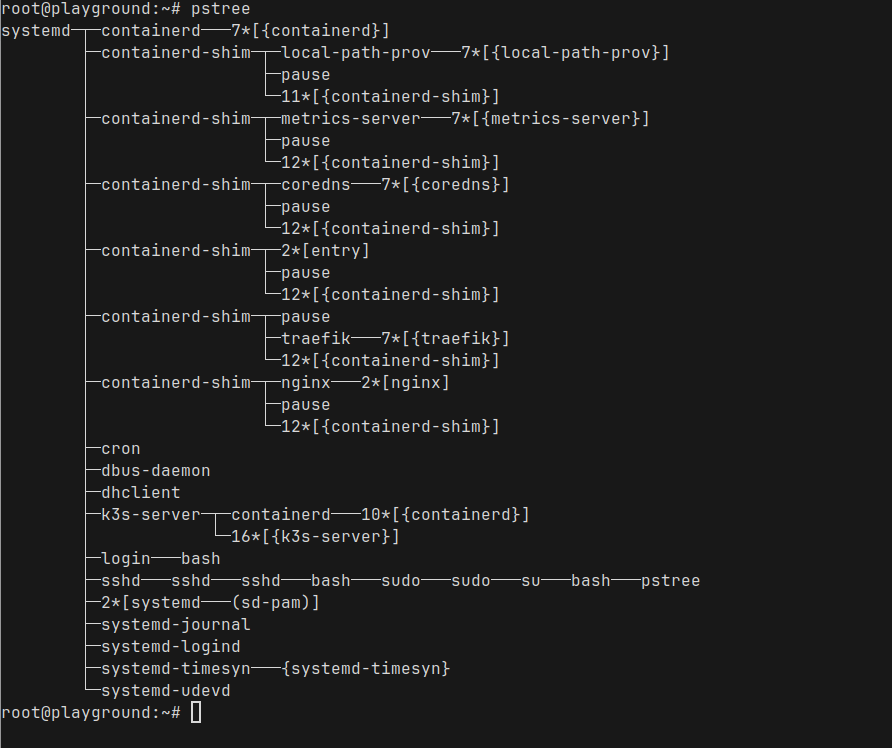
You can already see the nginx process running under the containerd-shim process
Since k3s uses containerd to run the containers, We can use crictl to look at the running containers (similar to docker ps)

Here we can see a bunch of containers that comes with k3s, and we also see our nginx container at the top. Perfect! Nginx is running with container id fdb8e461f5ce0
We can run crictl inspect fdb8e461f5ce0 to see a very detailed view of the container. It is way too much information, so I am not going to show the full output
Let's find the linux process ID of our container
root@playground:~# crictl inspect fdb8e461f5ce0 | grep pid
            "pid": 1
    "pid": 5896,
            "type": "pid"
root@playground:~#
The process id is 5896, which we can actually see directly as well
root@playground:~# ps aux|grep 5896
root         253  0.0  0.2  26380  5896 ?        Ss   17:11   0:00 /lib/systemd/systemd-udevd
root        5896  0.0  0.2   9516  5472 ?        Ss   17:59   0:00 nginx: master process nginx -g daemon off;
root        6383  0.0  0.1   6332  2068 pts/1    S+   18:09   0:00 grep 5896
root@playground:~#We can bring lsns back again, this time we pass the process ID and see all the namespaces for the Nginx process
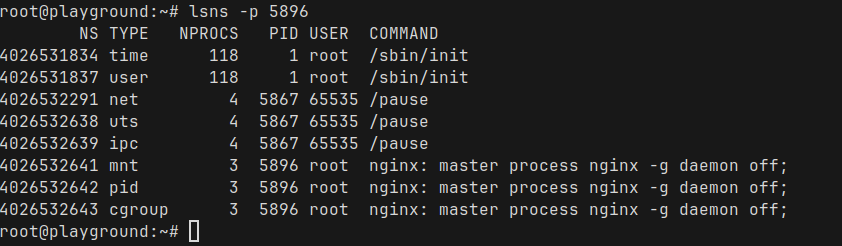
There are some really interesting observations here
exec into a pod, you’ll find that all containers share the same process space, network interfaces, and domain names.So, as we talked about before, cgroups are how Linux manages resource usage like CPU, memory and I/O for groups of processes.
Since we know the PID of the Nginx master process, let us take a look at the cgroup assigments
root@playground:~# cat /proc/5896/cgroup
0::/kubepods.slice/kubepods-besteffort.slice/kubepods-besteffort-pod6584cbdb_8529_4e28_8418_511e9056869e.slice/cri-containerd-fdb8e461f5ce08656bc92d114a76326a38b7f79c869c0ebf38e82e52d106254a.scope
root@playground:~#
/kubepods.slice/ - The Kubernetes pods are grouped under the kubepods slice/kubepods-besteffort.slice/ — This pod belongs to the besteffort quality-of-service class./kubepods-besteffort-pod6584cbdb_8529_4e28_8418_511e9056869e.slice/ — This specific pod’s cgroup, identified by its Pod UID (underscores _ replace dashes -)./cri-containerd-<container-id>.scope — The actual container process inside the pod, managed by containerd.We can even take a look at the current usage directly. For example, the memory usage
root@playground:~# cat /sys/fs/cgroup/kubepods.slice/kubepods-besteffort.slice/kubepods-besteffort-pod6584cbdb_8529_4e28_8418_511e9056869e.slice/cri-containerd-fdb8e461f5ce08656bc92d114a76326a38b7f79c869c0ebf38e82e52d106254a.scope/memory.current
3158016
root@playground:~#Now, let us add some CPU / memory requests and limits. Modify the pod yaml
apiVersion: v1
kind: Pod
metadata:
  name: nginx
spec:
  containers:
  - name: nginx
    image: nginx:stable-alpine
    resources:
      requests:
        memory: "64Mi"
        cpu: "50m"
      limits:
        memory: "128Mi"
        cpu: "100m"
    ports:
- containerPort: 80Let's find the process ID again as we did before
root@playground:~# crictl inspect c32fcc962d2bd | grep pid
            "pid": 1
    "pid": 7398,
            "type": "pid"
root@playground:~#If take a look at the cgroup directory again
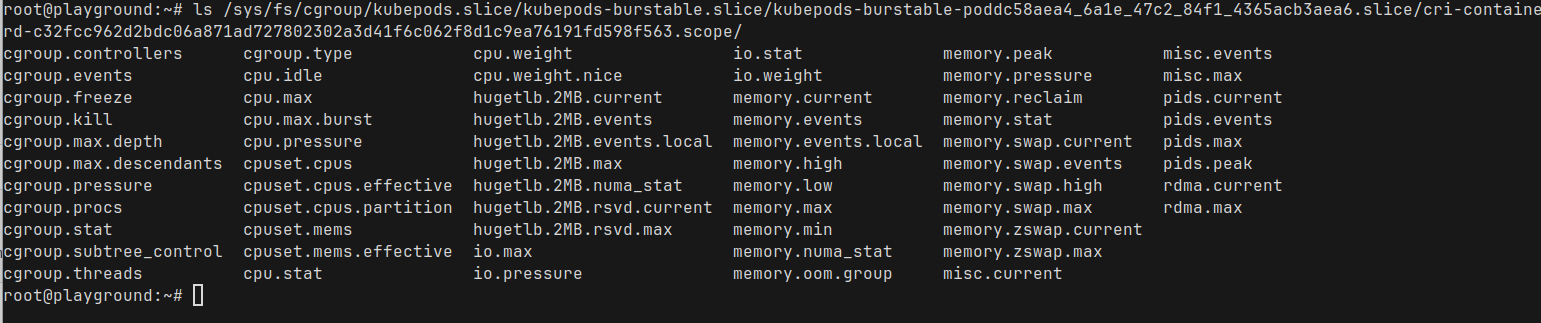
there are a ton of stuff in there. Let us take a look at the cpu.max and cpu.stats
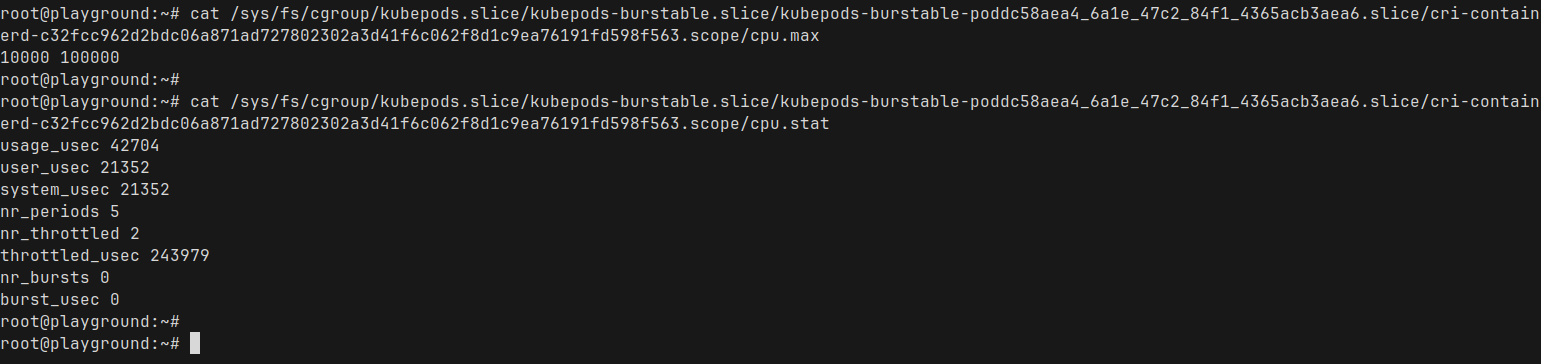
cpu.max : The first number is the quota, second is the periodA full CPU core (1000m in Kubernetes terminology) represents 100% of CPU time.
Since we set a limit of 100m for our Nginx pod, Kubernetes translates that into 10% of a single CPU core — which matches exactly what we are seeing in the cpu.max file
cpu.stats: This is showing the current CPU stats for that containerWhen we do kubectl exec into a pod, we are entering the namespace of that container (by default kubectl exec defaults into the first container – you can specify which container you want to exec into using -c container_name)
Similarly, we can actually enter the Linux namespace for the container and take a look around and see the things from the perspective of the container process itself
Let's find the process ID again and enter that namespace using nsenter
nsenter -t <pid> -a /bin/shThis should give us a shell inside the namespace. Let's take a look around
Listing processes
/ # ps aux
PID   USER     TIME  COMMAND
    1 root      0:00 nginx: master process nginx -g daemon off;
   30 nginx     0:00 nginx: worker process
   31 nginx     0:00 nginx: worker process
   33 root      0:00 /bin/sh
   38 root      0:00 ps aux
/ #ps aux we just ran.ip and hostname
/ # ip a
1: lo: <LOOPBACK,UP,LOWER_UP> mtu 65536 qdisc noqueue state UNKNOWN qlen 1000
    link/loopback 00:00:00:00:00:00 brd 00:00:00:00:00:00
    inet 127.0.0.1/8 scope host lo
       valid_lft forever preferred_lft forever
    inet6 ::1/128 scope host
       valid_lft forever preferred_lft forever
2: eth0@if15: <BROADCAST,MULTICAST,UP,LOWER_UP,M-DOWN> mtu 1450 qdisc noqueue state UP qlen 1000
    link/ether 4e:df:af:b2:e1:ff brd ff:ff:ff:ff:ff:ff
    inet 10.42.0.11/24 brd 10.42.0.255 scope global eth0
       valid_lft forever preferred_lft forever
    inet6 fe80::4cdf:afff:feb2:e1ff/64 scope link
       valid_lft forever preferred_lft forever
/ #
/ #
/ # hostname
nginx
/ #
Again, we see the isolated network namespace for the container with its own IP addresses and the hostname! How cool is that?
So, in this post, we took a bit of a deep dive into what actually happens when Kubernetes runs a pod. We’ve seen that at the end of the day, containers are just processes — with cgroups and namespaces applied for isolation and control.
Kubernetes might feel like magic sometimes, but it’s really built on solid Linux fundamentals. And understanding these fundamentals helps us scale and troubleshoot better and faster
Anyway, I had a ton of fun sneaking around in the terminal looking at all this stuff.
I hope this was at least a little bit helpful for you too! Thanks for reading. Leave a comment if you found this helpful
This is a re-publishing of a blog post I originally wrote for work, but wanted on my own blog as well.
AI is everywhere, and its impressive claims are leading to rapid adoption. At this stage, I’d qualify it as charismatic technology—something that under-delivers on what it promises, but promises so much that the industry still leverages it because we believe it will eventually deliver on these claims.
This is a known pattern. In this post, I’ll use the example of automation deployments to go over known patterns and risks in order to provide you with a list of questions to ask about potential AI solutions.
I’ll first cover a short list of base assumptions, and then borrow from scholars of cognitive systems engineering and resilience engineering to list said criteria. At the core of it is the idea that when we say we want humans in the loop, it really matters where in the loop they are.
The first thing I’m going to say is that we currently do not have Artificial General Intelligence (AGI). I don’t care whether we have it in 2 years or 40 years or never; if I’m looking to deploy a tool (or an agent) that is supposed to do stuff to my production environments, it has to be able to do it now. I am not looking to be impressed, I am looking to make my life and the system better.
Another mechanism I want you to keep in mind is something called the context gap. In a nutshell, any model or automation is constructed from a narrow definition of a controlled environment, which can expand as it gains autonomy, but remains limited. By comparison, people in a system start from a broad situation and narrow definitions down and add constraints to make problem-solving tractable. One side starts from a narrow context, and one starts from a wide one—so in practice, with humans and machines, you end up seeing a type of teamwork where one constantly updates the other:
The optimal solution of a model is not an optimal solution of a problem unless the model is a perfect representation of the problem, which it never is.
— Ackoff (1979, p. 97)
Because of that mindset, I will disregard all arguments of “it’s coming soon” and “it’s getting better real fast” and instead frame what current LLM solutions are shaped like: tools and automation. As it turns out, there are lots of studies about ergonomics, tool design, collaborative design, where semi-autonomous components fit into sociotechnical systems, and how they tend to fail.
Additionally, I’ll borrow from the framing used by people who study joint cognitive systems: rather than looking only at the abilities of what a single person or tool can do, we’re going to look at the overall performance of the joint system.
This is important because if you have a tool that is built to be operated like an autonomous agent, you can get weird results in your integration. You’re essentially building an interface for the wrong kind of component—like using a joystick to ride a bicycle.
This lens will assist us in establishing general criteria about where the problems will likely be without having to test for every single one and evaluate them on benchmarks against each other.
The following list of questions is meant to act as reminders—abstracting away all the theory from research papers you’d need to read—to let you think through some of the important stuff your teams should track, whether they are engineers using code generation, SREs using AIOps, or managers and execs making the call to adopt new tooling.
An interesting warning comes from studying how LLMs function as learning aides. The researchers found that people who trained using LLMs tended to fail tests more when the LLMs were taken away compared to people who never studied with them, except if the prompts were specifically (and successfully) designed to help people learn.
Likewise, it’s been known for decades that when automation handles standard challenges, the operators expected to take over when they reach their limits end up worse off and generally require more training to keep the overall system performant.
While people can feel like they’re getting better and more productive with tool assistance, it doesn’t necessarily follow that they are learning or improving. Over time, there’s a serious risk that your overall system’s performance will be limited to what the automation can do—because without proper design, people keeping the automation in check will gradually lose the skills they had developed prior.
Traditionally successful tools tend to work on the principle that they improve the physical or mental abilities of their operator: search tools let you go through more data than you could on your own and shift demands to external memory, a bicycle more effectively transmits force for locomotion, a blind spot alert on your car can extend your ability to pay attention to your surroundings, and so on.
Automation that augments users therefore tends to be easier to direct, and sort of extends the person’s abilities, rather than acting based on preset goals and framing. Automation that augments a machine tends to broaden the device’s scope and control by leveraging some known effects of their environment and successfully hiding them away. For software folks, an autoscaling controller is a good example of the latter.
Neither is fundamentally better nor worse than the other—but you should figure out what kind of automation you’re getting, because they fail differently. Augmenting the user implies that they can tackle a broader variety of challenges effectively. Augmenting the computers tends to mean that when the component reaches its limits, the challenges are worse for the operator.
If your job is to look at the tool go and then say whether it was doing a good or bad job (and maybe take over if it does a bad job), you’re going to have problems. It has long been known that people adapt to their tools, and automation can create complacency. Self-driving cars that generally self-drive themselves well but still require a monitor are not effectively monitored.
Instead, having AI that supports people or adds perspectives to the work an operator is already doing tends to yield better long-term results than patterns where the human learns to mostly delegate and focus elsewhere.
(As a side note, this is why I tend to dislike incident summarizers. Don’t make it so people stop trying to piece together what happened! Instead, I prefer seeing tools that look at your summaries to remind you of items you may have forgotten, or that look for linguistic cues that point to biases or reductive points of view.)
When evaluating a tool, you should ask questions about where the automation lands:
This is a bit of a hybrid between “Does it extend you?” and “Is it turning you into a monitor?” The five questions above let you figure that out.
As the tool becomes a source of assertions or constraints (rather than a source of information and options), the operator becomes someone who interacts with the world from inside the tool rather than someone who interacts with the world with the tool’s help. The tool stops being a tool and becomes a representation of the whole system, which means whatever limitations and internal constraints it has are then transmitted to your users.
People tend to do multiple tasks over many contexts. Some automated systems are built with alarms or alerts that require stealing someone’s focus, and unless they truly are the most critical thing their users could give attention to, they are going to be an annoyance that can lower the effectiveness of the overall system.
Tools tend to embody a given perspective. For example, AIOps tools that are built to find a root cause will likely carry the conceptual framework behind root causes in their design. More subtly, these perspectives are sometimes hidden in the type of data you get: if your AIOps agent can only see alerts, your telemetry data, and maybe your code, it will rarely be a source of suggestions on how to improve your workflows because that isn’t part of its world.
In roles that are inherently about pulling context from many disconnected sources, how on earth is automation going to make the right decisions? And moreover, who’s accountable for when it makes a poor decision on incomplete data? Surely not the buyer who installed it!
This is also one of the many ways in which automation can reinforce biases—not just based on what is in its training data, but also based on its own structure and what inputs were considered most important at design time. The tool can itself become a keyhole through which your conclusions are guided.
A common trope in incident response is heroes—the few people who know everything inside and out, and who end up being necessary bottlenecks to all emergencies. They can’t go away for vacation, they’re too busy to train others, they develop blind spots that nobody can fix, and they can’t be replaced. To avoid this, you have to maintain a continuous awareness of who knows what, and crosstrain each other to always have enough redundancy.
If you have a team of multiple engineers and you add AI to it, having it do all of the tasks of a specific kind means it becomes a de facto hero to your team. If that’s okay, be aware that any outages or dysfunction in the AI agent would likely have no practical workaround. You will essentially have offshored part of your ops.
What a thing promises to be is never what it is—otherwise AWS would be enough, and Kubernetes would be enough, and JIRA would be enough, and the software would work fine with no one needing to fix things.
That just doesn’t happen. Ever. Even if it’s really, really good, it’s gonna have outages and surprises, and it’ll mess up here and there, no matter what it is. We aren’t building an omnipotent computer god, we’re building imperfect software.
You’ll want to seriously consider whether the tradeoffs you’d make in terms of quality and cost are worth it, and this is going to be a case-by-case basis. Just be careful not to fix the problem by adding a human in the loop that acts as a monitor!
We don’t notice major parts of our own jobs because they feel natural. A classic pattern here is one of AIs getting better at diagnosing patients, except the benchmarks are usually run on a patient chart where most of the relevant observations have already been made by someone else. Similarly, we often see AI pass a test with flying colors while it still can’t be productive at the job the test represents.
People in general have adopted a model of cognition based on information processing that’s very similar to how computers work (get data in, think, output stuff, rinse and repeat), but for decades, there have been multiple disciplines that looked harder at situated work and cognition, moving past that model. Key patterns of cognition are not just in the mind, but are also embedded in the environment and in the interactions we have with each other.
Be wary of acquiring a solution that solves what you think the problem is rather than what it actually is. We routinely show we don’t accurately know the latter.
You probably know how straightforward it can be to write a toy project on your own, with full control of every refactor. You probably also know how this stops being true as your team grows.
As it stands today, a lot of AI agents are built within a snapshot of the current world: one or few AI tools added to teams that are mostly made up of people. By analogy, this would be like everyone selling you a computer assuming it were the first and only electronic device inside your household.
Problems arise when you go beyond these assumptions: maybe AI that writes code has to go through a code review process, but what if that code review is done by another unrelated AI agent? What happens when you get to operations and common mode failures impact components from various teams that all have agents empowered to go fix things to the best of their ability with the available data? Are they going to clash with people, or even with each other?
Humans also have that ability and tend to solve it via processes and procedures, explicit coordination, announcing what they’ll do before they do it, and calling upon each other when they need help. Will multiple agents require something equivalent, and if so, do you have it in place?
Some changes that cause issues might be safe to roll back, some not (maybe they include database migrations, maybe it is better to be down than corrupting data), and some may contain changes that rolling back wouldn’t fix (maybe the workload is controlled by one or more feature flags).
Knowing what to do in these situations can sometimes be understood from code or release notes, but some situations can require different workflows involving broader parts of the organization. A risk of automation without context is that if you have situations where waiting or doing little is the best option, then you’ll need to either have automation that requires input to act, or a set of actions to quickly disable multiple types of automation as fast as possible.
Many of these may exist at the same time, and it becomes the operators’ jobs to not only maintain their own context, but also maintain a mental model of the context each of these pieces of automation has access to.
The fancier your agents, the fancier your operators’ understanding and abilities must be to properly orchestrate them. The more surprising your landscape is, the harder it can become to manage with semi-autonomous elements roaming around.
One way to track accountability in a system is to figure out who ends up having to learn lessons and change how things are done. It’s not always the same people or teams, and generally, learning will happen whether you want it or not.
This is more of a rhetorical question right now, because I expect that in most cases, when things go wrong, whoever is expected to monitor the AI tool is going to have to steer it in a better direction and fix it (if they can); if it can’t be fixed, then the expectation will be that the automation, as a tool, will be used more judiciously in the future.
In a nutshell, if the expectation is that your engineers are going to be doing the learning and tweaking, your AI isn’t an independent agent—it’s a tool that cosplays as an independent agent.
All in all, none of the above questions flat out say you should not use AI, nor where exactly in the loop you should put people. The key point is that you should ask that question and be aware that just adding whatever to your system is not going to substitute workers away. It will, instead, transform work and create new patterns and weaknesses.
Some of these patterns are known and well-studied. We don’t have to go rushing to rediscover them all through failures as if we were the first to ever automate something. If AI ever gets so good and so smart that it’s better than all your engineers, it won’t make a difference whether you adopt it only once it’s good. In the meanwhile, these things do matter and have real impacts, so please design your systems responsibly.
If you’re interested to know more about the theoretical elements underpinning this post, the following references—on top of whatever was already linked in the text—might be of interest:


A shift left approach to data processing relies on data products that form the basis of data communication across the business. This addresses many flaws in traditional data processing and makes data more relevant, complete, and trustworthy.
By Adam Bellemare
Cognitive load is what matters
Excellent living document (the underlying repo has 625 commits since being created in May 2023) maintained by Artem Zakirullin about minimizing the cognitive load needed to understand and maintain software.This all rings very true to me. I judge the quality of a piece of code by how easy it is to change, and anything that causes me to take on more cognitive load - unraveling a class hierarchy, reading though dozens of tiny methods - reduces the quality of the code by that metric.
Lots of accumulated snippets of wisdom in this one.
Mantras like "methods should be shorter than 15 lines of code" or "classes should be small" turned out to be somewhat wrong.
Via @karpathy
Tags: programming, software-engineering